
Most searches for undetectable ai reviews are really asking two different questions: can the product improve an awkward AI draft, and can anyone promise what an AI detector will report afterward? Those questions should not be treated as the same thing. In this review, I look at Undetectable AI's current workflow, rewrite controls, detector, pricing, and practical limits. I also explain where a focused alternative such as Ryter Pro may fit better.
I checked the public product pages and the workspace shown in the supplied screenshot. The result is a useful but qualified picture. Undetectable AI puts several writing and detection tools in one account, which is convenient. Its humanizer can help restructure a stiff draft, but the output still needs a human edit, a fact check, and a policy check before publication or submission.
Undetectable AI Reviews 2026: Quick Verdict
- Best for: writers who want a detector and a rewriting workspace in the same browser product.
- What stands out: the workflow combines AI checking, humanization modes, writing contexts, and file or text input.
- What needs caution: a lower score in one detector does not prove that a passage is human-written or original.
- Pricing note: the public pricing page shows monthly word bundles, annual promotional prices, and a limited free trial. Check the live account before buying.
- My verdict: worth trying for revision and readability work, but not as a guaranteed way to evade every detector.
What Is Undetectable AI?
Undetectable AI is a web-based writing platform built around two related jobs: estimating whether text looks AI-generated and rewriting text so it sounds less mechanical. The wider product also presents an AI image detector, a browser extension, business features, and API access. That breadth makes it different from a small paraphrasing page with one text box and one output button.
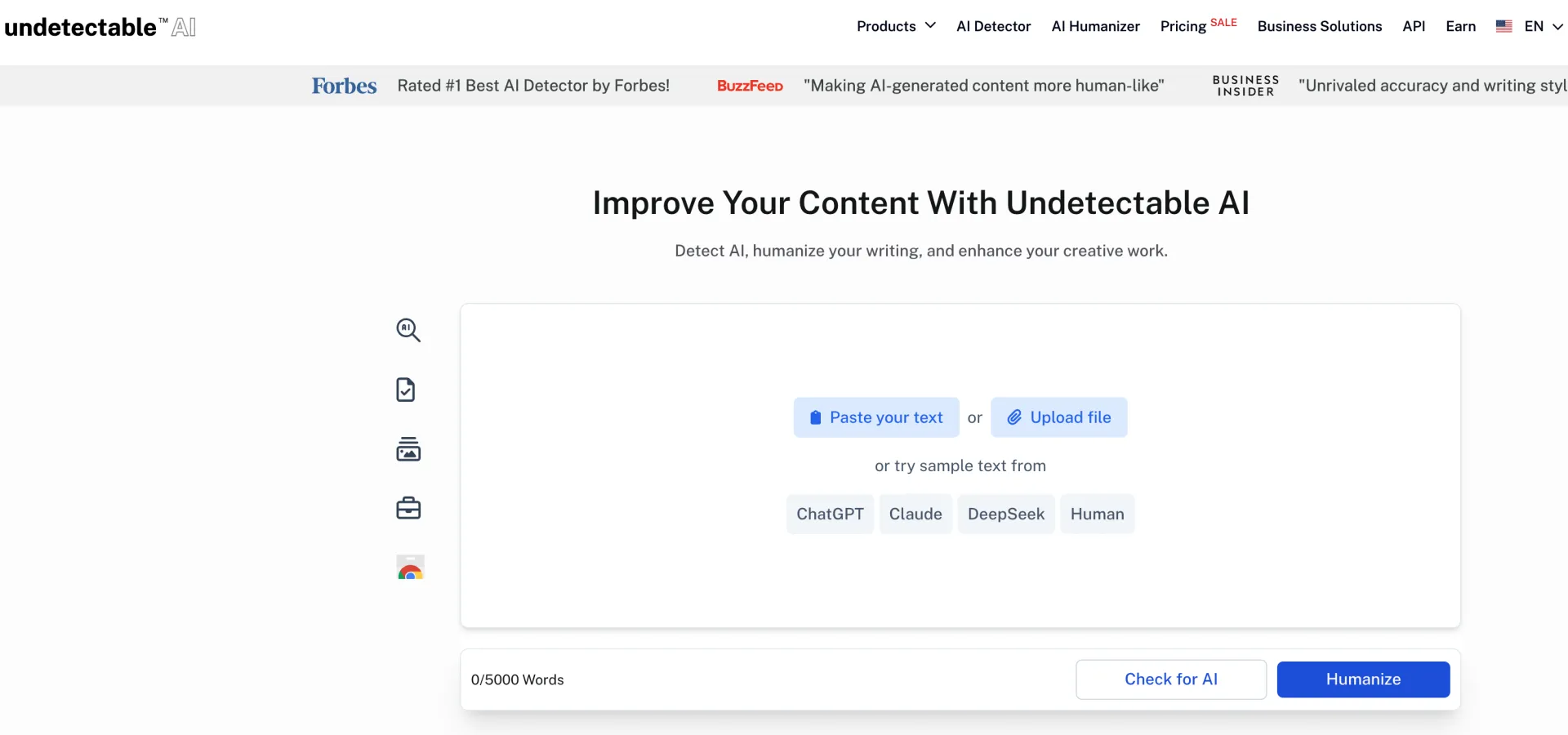
The main editor is easy to understand. You can paste text or upload a file, run a check, and then choose a Humanize action. The workspace also displays sample sources such as ChatGPT, Claude, DeepSeek, and Human, which helps a new user understand the type of text the detector is designed to inspect. That does not make the result a scientific benchmark, but it does make the first session less confusing.
How the Undetectable AI Workflow Feels
1. Add or upload a draft
The first step is familiar: paste a passage into the editor or upload a supported file. The homepage workspace displays a 5,000-word counter, while the dedicated humanizer page describes a 10,000-character input limit. The pricing page also describes a 250-word free trial. These numbers appear to belong to different product surfaces or access levels, so users should check the limit shown in their own account rather than assume that one number applies everywhere.
2. Check the draft before rewriting
The detector gives you a starting signal and, in the product walkthrough, can point to sentences that affect the result. That can be useful when you are editing a blog post or a marketing draft and want to find sections that feel repetitive. It is less useful when someone treats the percentage as a verdict about authorship. AI detectors can disagree, and their output can shift with text length, topic, language, and model updates.
3. Choose a humanization mode
The humanizer presents Basic and Stealth modes, along with contexts such as General Writing, Essay, Article, Marketing Material, and Story. These labels suggest a sensible workflow: use a lighter pass when the draft already has your voice, and reserve a stronger pass for text that is repetitive or too formal. A stronger setting can also make larger changes to emphasis and sentence structure, so it deserves a closer review.
4. Read the result as an editor
The important part happens after the output appears. Look for changed numbers, softened claims, missing qualifiers, invented transitions, and phrases that sound unlike you. I would also compare headings and terminology with the original. A rewrite that changes the rhythm but loses the writer's point is not an improvement, even if a detector score moves in the desired direction.
Undetectable AI Features Worth Knowing
AI humanizer and detector in one workspace. Having both steps together makes iteration quick. You can inspect the source, rewrite it, and review the result without moving between several tabs. The weakness is that the built-in detector is still one signal from one product. It should not be presented as a universal measurement.
Writing contexts and rewrite modes. A marketing paragraph, a personal story, and an academic explanation need different editorial choices. Context labels are helpful because they remind users that human-sounding writing is not one fixed style. Still, the setting cannot know your audience, your house style, or the facts behind the draft.
Language support. The public product pages advertise support for more than 50 languages, with the strongest accuracy claimed for English. That is a useful starting point for multilingual teams, but quality can vary by language and text type. Test a representative passage before processing a large batch.
Browser extension, image detection, and API options. The broader platform is designed for users who want writing checks across browser-based work, image-related checks, or an integration path. Those features may be valuable for teams, though they also make the product harder to compare with a simple text rewriter. Compare the exact plan and usage limits for the feature you actually need.
Undetectable AI Pricing in 2026
When I checked the public pricing page in September 2026, the displayed monthly options were organized by words per month. The page showed the following figures:
| Monthly volume | Displayed monthly price | Annual promotional price |
|---|---|---|
| 10,000 words | $9.99 | $5.00 per month, billed annually |
| 20,000 words | $19.00 | $9.50 per month, billed annually |
| 35,000 words | $31.00 | $15.75 per month, billed annually |
| 50,000 words | $42.50 | $21.25 per month, billed annually |
The same page advertises a free trial limited to 250 words. It also lists features such as detector and humanizer access, Basic and Stealth modes, writing-level matching, API compatibility, and an auto-typing feature. Promotions and plan details can change, and the 50,000-word row should be confirmed in the checkout flow because the public page displayed an inconsistent secondary number beside that tier.
For occasional editing, the smallest plan may be enough. For an agency, publisher, or product team, the real cost depends on how often you retry a rewrite and whether detector checks count against a separate allowance. I would calculate usage from real drafts rather than from the headline monthly number.
Does Undetectable AI Make Text Undetectable?
This is where many undetectable ai reviews become too confident. Undetectable AI's own pages use strong performance language and show high human scores in product examples. Those are vendor demonstrations, not an independent, permanent pass rate. A detector may classify the same paragraph differently after a model update, and two detectors may disagree on the same submission.
There is also a more basic problem: a detector score measures a pattern estimate, not the writer's process. A low score cannot prove that a passage is original, factually correct, or permitted under a school's or employer's rules. A high score does not prove misconduct either. It can be a reason to inspect the draft, not a replacement for evidence such as notes, version history, citations, and subject knowledge.
My practical test for any humanizer is therefore broader than the percentage. Does it preserve the claim? Does it keep the terminology accurate? Does the paragraph sound like the intended writer? Does it add unnecessary certainty? Can the author explain and support every sentence? If the answer to those questions is no, a better detector score would not rescue the draft.
What Undetectable AI Does Well
- The central editor is approachable for first-time users.
- Detector and rewrite steps sit in the same general workflow.
- Basic and Stealth modes give users a choice about how much text should change.
- Writing contexts make it easier to start with an appropriate editorial direction.
- The wider product includes features for browser work, images, teams, and integrations.
- The pricing page is organized around a simple monthly word allowance.
Where Undetectable AI Falls Short
- The product's marketing language can sound more certain than real-world detector behavior allows.
- Different public pages show different input limits, so access level and product surface matter.
- A deep rewrite can remove nuance or make a passage sound generic.
- The detector cannot tell you whether a fact, citation, or source is trustworthy.
- Users still need to check the output for plagiarism, policy compliance, and personal voice.
- People who only need a focused text rewrite may not use the broader toolset enough to justify it.
Undetectable AI vs Ryter Pro
These products overlap, but they emphasize different workflows. Undetectable AI is a broader platform with detection, humanization, image checking, browser-oriented features, and API or business options. That can be useful when one account needs several kinds of content checks.
Ryter Pro's text humanizer is a more direct alternative for someone whose immediate job is to revise an AI-assisted draft. The shorter path can make sense when you want to focus on sentence structure, rhythm, clarity, and your own final edit instead of managing a larger set of tools.
I would choose based on the task rather than the promise. Pick Undetectable AI if its detector and wider platform features are central to your workflow. Try Ryter Pro if you want a focused rewriting page and a practical way to improve a draft before you inspect it line by line. In both cases, judge the result by meaning and readability first.
Who Should Use Undetectable AI?
It is a reasonable fit for content teams that want a combined detector and humanizer, marketers who revise large batches of early drafts, and developers who need to investigate API or business access. It can also help an individual writer identify repetitive passages before a manual edit.
It is a poor fit for anyone looking for a magic button that proves authorship or guarantees a particular detector outcome. It is also a poor fit for a writer who plans to submit the output without understanding the content. The more sensitive the work, the more important it is to keep notes, verify sources, and follow the relevant disclosure rules.
A Better Way to Use Any AI Humanizer
- Write the substance first. Start with your own outline, examples, data, and point of view. A humanizer cannot supply experience you do not have.
- Use the lightest useful setting. Preserve sentences that already sound natural. Larger changes are not automatically better.
- Protect facts and terms. Recheck names, numbers, citations, product labels, technical phrases, and legal or medical wording after every rewrite.
- Compare before and after. Keep the original beside the output so you can spot missing qualifications or changes in emphasis.
- Read it aloud. Your ear catches stock transitions, strange certainty, and repeated sentence shapes quickly.
- Run an originality and source review. A humanizer changes phrasing. It does not make borrowed ideas yours or verify a citation.
- Follow the rules that apply. Schools, clients, employers, and publishers may have different policies for AI-assisted writing. Keep a record of how the draft was produced.
Frequently Asked Questions
Is Undetectable AI free?
The public pricing page shows a free trial limited to 250 words, while paid plans provide larger monthly word allowances. Limits and promotions can change, so check the current account or checkout details before relying on the free option.
What does Undetectable AI include?
Its current public product pages describe an AI detector, AI humanizer, image detector, browser extension, business features, and API access. The exact features available to you depend on the product surface and plan.
Does Undetectable AI guarantee that every detector will mark text as human?
No. Its performance examples are vendor claims, and different detectors can produce different results. A rewrite should be judged by accuracy, clarity, originality, and compliance as well as by any detector signal.
Is Undetectable AI suitable for academic writing?
It offers an Essay context, but that does not make every generated or rewritten passage acceptable for school use. Follow the institution's AI policy, verify every source, and make sure you can explain the final work.
Is Ryter Pro an alternative to Undetectable AI?
Yes. Ryter Pro is worth testing when you want a focused web workflow for revising AI-assisted text and then making the final editorial decisions yourself.
Final Summary
Undetectable AI is a broad writing utility with a clear browser workflow, multiple humanization modes, a built-in detector, and extra tools for teams and integrations. The free trial is useful for a small experiment, while paid plans are organized around monthly word volume. The main issue is the same one that matters across all undetectable ai reviews: no product can turn a detector percentage into proof of authorship or promise a permanent result across every checker.
Use Undetectable AI when its combined toolset matches your work. Use Ryter Pro's AI humanizer when you want a direct rewrite workflow. Whichever route you choose, add your own thinking, check the facts, preserve the meaning, and treat the final pass as your responsibility.